No deductions.
The manufacturer list is three flours, with no additives declared. No deductions in this example.
30 / 30Independent food intelligenceZucchini Penne · Veggie Craft · 227 g
01 / The pack
The front gets your attention. It does not tell you everything. Scan the barcode and befood reads the label, not the marketing: a food score you can question, every point explained.
iPhone · TestFlight beta, seats open in small groups · Independent, no ads
Understand
Every point has a reason. Lilac raises, orange lowers. Remove the ingredient analysis and watch the result become a range.
Zucchini Penne, Veggie CraftManufacturer example · 227 g · Gluten-free · Vegan · Nutri-Score 2023
83/100A
Excellent, with reasons.
52.8 nutrition points + 30 additive points + 0 organic bonus. Rounded once, to 83. Nutri-Score 2023 for nutrition, on the phone.
The nutrition index, weighted at 60%. Protein and fibre raise it; energy pulls it down.
Complete example analysis, no deductions.
No bonus without documented certification.
IngredientsPea flour, lentil flour, zucchini flour.
The manufacturer list is three flours, with no additives declared. No deductions in this example.
30 / 30No certification is provided for this example. The organic contribution is zero.
0 / 10The calculation88 × 60% + 30 + 082.8 before rounding → 83 / 100. The nutrition index of 88 is an illustrative input.
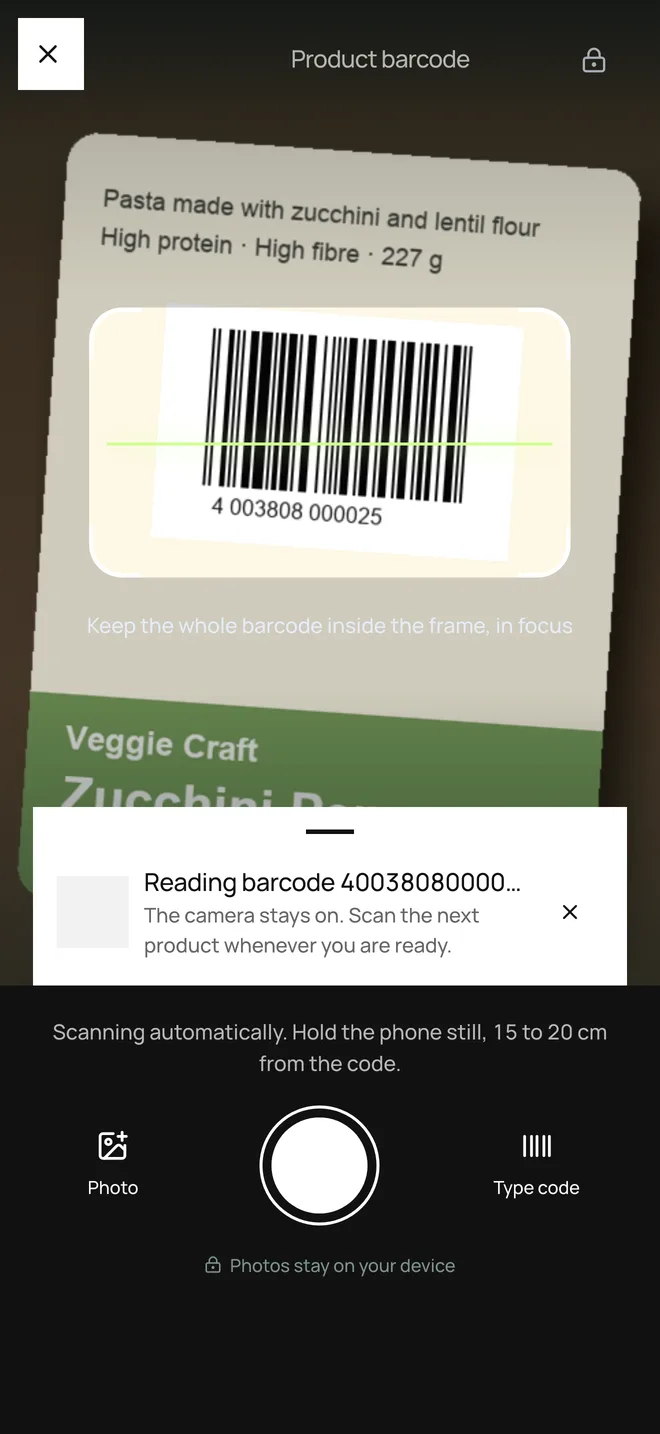
Scan
The camera reads the barcode on the phone. No photo leaves your hands. Damaged code? Type it, or let the label reader take it from the nutrition table.
The food score is computed on the phone, and every point comes with its line on the label: what raised it, what lowered it, what is still missing. A number with reasons, not a verdict.
See suggested products, compare two packs line by line, and find a shop near you that sells what you scanned. What the source does not know stays a range, never a guess.
Find shops near you for any product you just scanned.
Compare and explore
01 / 03
Nutrition per 100 g and per serving, ingredients, safety, sources. Then the shops nearby that stock it.
02 / 03
Breakfast cereals, yogurts, dry pasta: comparable products in your country, best complete score first. Not a health ranking.
03 / 03
Scan product B, or pick a recent one. The lines that differ come first, with the difference that decides.
Recalls
Food safety notices are published every day, in places nobody reads. befood checks them against what you scanned and what you bought, and sends one notification when it matters: the product, the lot, what to do.
Receipts
Nobody scans thirty items at the checkout. Photograph the receipt: befood reads it on the phone and matches every line.
The photo stays on your phone. Only the text you choose to save reaches your account. From any confirmed product you can search nearby supermarkets in the app.
Independent
Nobody pays to be here. befood is not sponsored, does not sell placement and never will: a score you can buy is not a score.
Product data comes from Open Food Facts, the open database built by people like you, and from the USDA. Corrections you make go back to the commons.
Label and receipt photos stay on the phone. An optional profile picture is stored with your account. Without an account, nothing about you reaches us at all. With one, you can delete everything in a single tap. Read the privacy page.
A label becomes information.Start with what is on the pack: nutrition, ingredients, the details behind the promise.
Information becomes perspective.Every point has a reason. Open the detail to see what is known, and what is still missing.
Perspective becomes your choice.Take it into the next shop. The score is a tool. The last word is yours.
Questions
Three contributions, computed on the phone: Nutri-Score 2023 for nutrition (60%), assessed additives (30%), and 10 points when organic certification is documented. Open the detail to see every line and the threshold that decided it.
See the exampleNo. Coverage varies. Missing fibre, an uncertain category or an unreviewed additive becomes a range, never a guess. What the source does not know stays visible.
Try incomplete dataA score summarises selected characteristics of a product. It cannot establish personal suitability, allergy safety or the quality of a diet. Check the actual label.
The last word is yoursOne photo reads the shop. When a match has a complete record, you see the food score; otherwise a range. Suggested products sit next to each line so you can pick the right pack. The photo stays on the phone; only the text you keep reaches your account.
Follow the receiptYes. From a product you scanned — or a confirmed line on a receipt — you can search nearby supermarkets in the app. It uses your area or location to list shops; it does not confirm that a particular pack is in stock.
Scan, then find shopsOff by default. On per kind, in your profile. befood checks published notices against what you scanned and what you bought, and sends one notification when it matters: the product, the lot, what to do.
How recalls find youbefood is on iPhone. The App Store listing is in review; meanwhile seats open in small groups through TestFlight. Send the request below. Scan still works without an account.
Request a seatOn iPhone
The App Store listing is in review. Until it is live, seats open in small groups through Apple’s TestFlight. After the first sign-in you can turn on Face ID for the next time. Scan still works without an account.